
How to use AI to plan your day
To use AI to plan your day, give an AI assistant your fixed events, your to-dos and your habits, ask it to add travel and prep, and ask for one line per step. That works with Claude, ChatGPT and other assistants. What a chat does not do is run the day.
How to use AI to plan your day, step by step
- Tell it what is fixed. Meetings, appointments, pickups, with times and travel. Add your wake-up time and when you want to be done.
- List your to-dos with rough minutes. “Send the invoice, about 30 minutes” gives it something to schedule. Add the habits you want to keep.
- Ask it to add what you forget. Travel before anything away from home, prep before a call, and any wait (laundry, oven, a download) as its own step. Let it drop a habit rather than squeeze it in.
- Ask for one line per step, then re-plan as the day changes. Reply with what happened, such as “It is 2:15 and the call ran 40 minutes over,” and ask for the rest of the day again.
Fill in the brackets and paste it.
Plan my day for [today / tomorrow].

Fixed (do not move): [time, event, travel time]
To-dos: [task, rough minutes, deadline]
Habits to keep: [20-minute walk, 10 pages of reading]

Add travel and prep as their own steps. If something is a wait (laundry, oven, a download), make the wait its own step and put the next useful thing right after it. If something does not fit, drop it and tell me instead of squeezing it in.

Give the plan as one line per step: start time, action, minutes.
Our guides have fuller versions: how to use Claude to plan your day and the ChatGPT daily planner prompt. Plain text is a draft: the assistant only knows what you tell it or what you have connected, and its time estimates are guesses.
What a day planned with AI looks like
Say you tell your AI: dentist at 9:30 (25 minutes away), a team call at 2:00, a parcel to collect before 6, an invoice to send, laundry and groceries. Habits: a 20-minute walk and some reading. A good assistant returns something like this:
- 8:15 Get ready (30 min)
- 9:00 Leave for the dentist (25 min, plus 5 spare)
- 9:30 Dentist (60 min)
- 11:00 Start the laundry (5 min). It runs about 50 minutes.
- 11:05 Send the invoice (30 min)
- 11:40 Walk (20 min)
- 12:00 Move the laundry to the dryer (5 min)
- 1:45 Open the call notes and join (15 min prep)
- 2:00 Team call (45 min)
- 3:15 Collect the parcel, then groceries (60 min)
- 8:30 Read ten pages (20 min)
That is a real plan. The walk sits in a gap, the dentist has travel on both sides, the laundry has a follow-up step, and the invoice fills the wait. Now the call runs to 3:20. You tell the AI, and it moves the parcel and groceries and drops nothing important. All of this is the part AI is good at.
Can I use AI to plan my day? What it does well
Yes, and the planning part is what it does best. Four jobs:
- Fitting habits between the schedule and the to-dos. A walk or ten pages of reading go into the gaps instead of on top of your meetings.
- Adding what you forget. Travel time before anything away from home, prep before a call, getting ready.
- Seeing conflicts. A call that ends at 3:00 and an errand across town at 3:15 do not fit, and it says so.
- Re-planning. Tell it the morning ran late and it lays out the rest of the day again, in seconds.
Best AI to plan my day: Claude, ChatGPT or a dedicated planner?
The general assistants plan well and are free to start; the dedicated planners keep the plan in your calendar for you. Pick by where you want the plan to live.
Claude and ChatGPT: an AI assistant to plan my day
- Claude. It can read your Google Calendar through its connector (listed for the Pro, Max, Team and Enterprise plans), so it plans around real events. Claude for iOS can create reminders if you allow it, and paid Claude plans can run scheduled tasks.
- ChatGPT. It has Tasks that run a prompt once or on a schedule, so a recurring task can deliver a day plan at a time you choose. Exact delivery times need a paid plan, and the number of active tasks is capped by plan.
Either one works with the prompt above. Both can also connect to an app that runs the plan; see how to add a custom connector in Claude.
Dedicated AI planners: Motion and Reclaim
They are a real alternative, and for some jobs they are better.
- Motion describes itself as an AI productivity platform that combines tasks, projects, a calendar, docs and meetings. It prioritizes your tasks and time-blocks them on your calendar, and it can bring Outlook, Google and iCloud calendars into one view. It has a free trial and paid plans.
- Reclaim is an AI calendar assistant that works with Google Calendar and Outlook. It protects focus time, shifts habits to open slots, schedules tasks by priority, finds meeting times across attendees and adds buffer time. It has a free plan for individuals.
If your work is calendar-heavy or team-based, their automatic rescheduling and shared scheduling go further than ours. one-by.one has no team scheduling and does not move your calendar events. The difference is where the plan lives. They keep the plan in the calendar, automatically. With one-by.one your own assistant makes the plan, and the phone runs it one card at a time. Neither is wrong; pick the shape that matches how you work.
What AI can’t do on its own
The plan above is text in a chat. Planning was never the whole problem. Following it is, and a chat reply is a poor place to follow anything.
- Hold the plan. Once the conversation scrolls away or you open another app, the plan is just a message you have to find. Some assistants have memory or reminders, but a remembered plan is not a plan that is running.
- Notice a wait. The laundry ends at 11:50. Unless you set a reminder, a chat plan will not alert you. ChatGPT Tasks can send scheduled notifications, within plan limits, but a reminder does not know the wait is over and which step comes next, so the wet clothes can still sit there. Waits are where days quietly break: the oven, a download, a pickup window.
- Bring a follow-up back at the right moment. “Move the laundry” only helps if it appears when the cycle ends, not when you next scroll.
- Keep you on one next step. A list of eleven lines is a list to re-sort every time you look up. You pick, you skip ahead, you lose your place.
So the person ends up as the project manager of their own day: checking the list, remembering the wait, asking the AI again. That is the work you hoped to hand off. It is the same overwhelm described in our manifesto, now with a better list.
How one-by.one covers the gap
one-by.one is the part after the plan. Your own AI, Claude, ChatGPT or another assistant that supports MCP, does the planning and saves the day to the iPhone app as cards. The app never calls an AI model and plans nothing itself. It runs the day one card at a time: Start, Done, Skip or Dismiss, and Undo if you mis-tap.
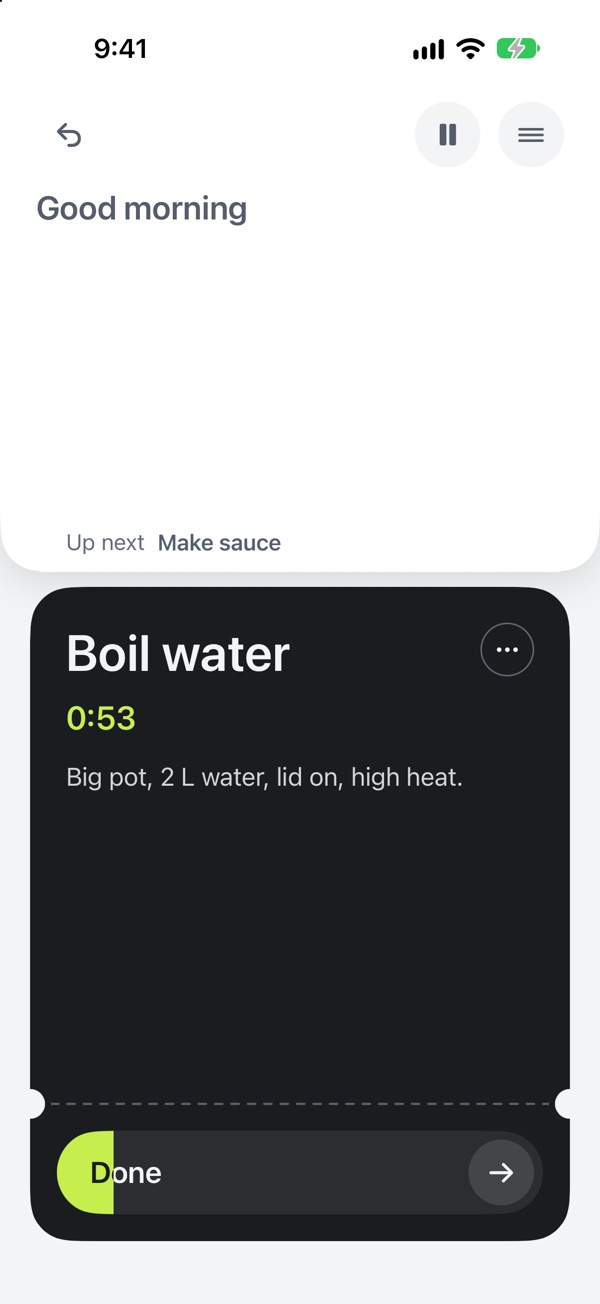
A wait gets a timer. When it ends, the follow-up card comes back, so the laundry is not forgotten. Lock Screen and StandBy widgets show the current card, and Records show what you did. When the day changes, you tell your AI and it updates the cards. Your AI plans. You just do.
Setup is a custom connector with the URL https://mcp.one-by.one/mcp; the steps are on the Connect page.
Who doesn’t need this
Plenty of people do fine without it. If you already live in a calendar and a list, and you check them without friction, a chat plan copied into Apple Reminders, Todoist or your calendar works. If your days are mostly the same, you may never need to plan at all. If a paper list keeps you on track, keep the paper.
one-by.one is also narrow on purpose. It is iPhone only, the interface is English only, and it is a paid subscription: US$59.99 a year, with a 14-day free trial for eligible new subscribers, or US$12.99 a month.